
What Is an Administration Panel?
An admin panel is a tool with a visual interface. You use it to control and manage a server. It’s easier than typing text commands. Even people with little tech skill can use it.
Skilled admins can do every server task with text commands alone. But a hosting panel makes daily tasks much easier. Here’s what you can do with one:
- Create or delete FTP accounts
- Connect and manage domains
- Add or remove subdomains
- Manage email accounts
- Create and manage databases
- Set up backups and security
Modern hosting panels aren’t just for server experts. They’re built for beginners too. You can manage your website and hosting while you learn.

There are two main types of hosting panels:
- Premium (paid) hosting panels
- Free and open-source hosting panels
Premium Hosting Panels
We’ll look at four popular paid panels: cPanel, Plesk, DirectAdmin, and RunCloud.
cPanel
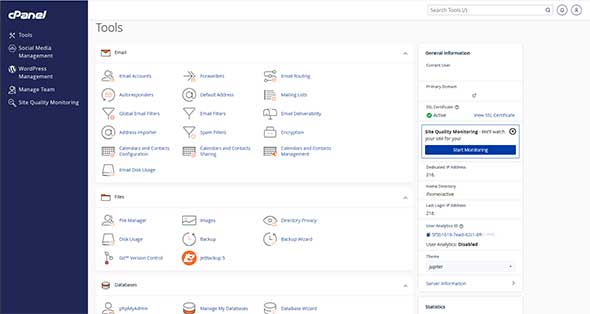
cPanel is one of the most popular hosting panels in the world. Many hosting providers support it. Developers, businesses, and hosting companies use it to manage websites on dedicated servers and VPS setups.
cPanel offers many tools in one place: server admin, website management, email hosting, security, and backups. It works well for experts and beginners alike.
One handy feature is the built-in app installer. You can install apps like WordPress in just a few clicks.
Key cPanel Features
- Check available disk space
- Manage FTP accounts
- Connect to FTP servers
- Create, edit, and delete databases
- Access databases remotely
- Manage domains and DNS
- Create and restore backups
- Manage SSL/TLS
- Block IPs and set password protection
cPanel is still one of the most complete, beginner-friendly premium panels available today.
Plesk
Plesk is another popular hosting panel. It works on both Linux and Windows servers. Like cPanel, it has a simple, easy-to-use interface.
With Plesk, you manage websites, databases, email accounts, and VPS servers from one dashboard. It also has one-click app installs, including WordPress.
Plesk is flexible and powerful. That’s why it works well for both simple hosting setups and complex server infrastructure.
Key Plesk Features
- Easy installs for extra apps
- Multi-level user access
- Mobile app access
- Support for 30+ languages
- Monitor and manage server services
- Backup and restore tools
- Built-in security and performance tools
Plesk works well for businesses and agencies that need both Windows and Linux hosting.

By Laurarosagob – Own work, CC BY-SA 4.0
DirectAdmin
DirectAdmin is a lightweight hosting panel. It’s built mainly for shared hosting and VPS, and runs through your browser.
Compared to bigger panels, DirectAdmin uses fewer system resources. Its interface is simple and fast, with all the key hosting features you need.
The interface is beginner-friendly. But some basic server knowledge helps.
Key DirectAdmin Features
- DNS management
- Domain and subdomain setup
- Email account management
- Create user and reseller accounts
- SSL certificate management
- Cron job management
- File manager access
- Database management
DirectAdmin Access Levels
DirectAdmin has three user levels:
- Administrator — Full access to all server and account features
- Reseller — Access to reseller and user-level tools
- User — Access limited to their own hosting account
People often pick DirectAdmin when they want something fast, light, and affordable.
RunCloud
RunCloud is a modern cloud server panel built for developers and advanced users. It has a great interface, strong tools, and fair pricing.
Most hosting panels focus mainly on websites. RunCloud goes further — it gives you control over both servers and apps. Even with many advanced features, the interface stays clean and organized.
RunCloud includes many developer tools and integrations. This makes it a strong choice for teams managing several projects at once.
Key RunCloud Features
- Multiple server stack setups
- Git integration
- WordPress staging environments
- Server and app monitoring
- Simple SSH management
- Fast deployment workflows
- Built-in caching (FastCGI)
- Easy server cloning and scaling
RunCloud works great for developers. It’s ideal if you run test environments, use Git-based workflows, or manage many sites across different servers.
However, RunCloud may may not suit non-technical users. It’s built around server management and development work. Beginners looking for simple website hosting may find it overwhelming.
A few more things to know:
- Some features need manual setup
- phpMyAdmin isn’t included by default
- Support options are more limited than with traditional hosting panels
Overall, RunCloud is a strong pick for developers and agencies who want a fast, flexible, modern cloud server platform.
Free & Open-Source Hosting Panels
Now let’s look at four popular free panels: aaPanel, CloudPanel, HestiaCP, and CyberPanel.
aaPanel
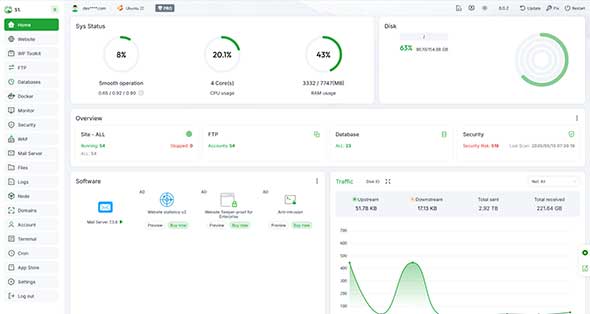
aaPanel is a free, open-source hosting panel. It makes server and website management simple with an easy graphical interface.
It’s built on the LAMP/LEMP stack. That makes it a good fit for developers, system admins, and beginners who want an affordable option.
The interface is clean and easy to learn, while still offering plenty of advanced tools.
How aaPanel Works
aaPanel includes the core tools you need to manage hosting:
- Linux server management
- Apache or NGINX web server support
- MySQL database management
- PHP environment setup
Once installed, you manage everything from your browser.
Key aaPanel Features
- One-click app installs
- Domain management
- Database management
- Email management
- File management
- DNS management
- Security tools and monitoring
aaPanel comes in a free version and a paid Pro version. It also has a large library of plugins, so you can add features as you need them.
aaPanel is flexible and works well for both beginners and experienced admins.
CloudPanel
CloudPanel is a light, fast hosting panel built mainly for cloud server management. The interface is clean, modern, and quick to use.
It’s designed mostly for server admins, not resellers or shared hosting users. Still, it’s simple enough for less experienced users too.
CloudPanel’s biggest strength is its light, responsive interface, which makes common server tasks quick and efficient.
Key CloudPanel Advantages
- Fast, lightweight interface
- Real-time server monitoring
- Built-in logs and performance tools
- Built-in Redis support
- Auto-login for phpMyAdmin
- Optimized Debian, NGINX, and Percona stack
CloudPanel keeps things fast and simple. But it skips some common panel features, such as:
- Email hosting
- Built-in file manager
- Multi-user reseller tools
Because of this, CloudPanel works best for admins who want a fast, modern panel for NGINX-based servers.
Key CloudPanel Features
- Built for admins, not resellers
- Auto-login for phpMyAdmin
- Real-time server monitoring
- Uses very few resources
- Clean, modern interface
CloudPanel is a great choice if you value speed and simplicity over traditional shared hosting features.
HestiaCP
HestiaCP is a modern fork of the popular VestaCP control panel. It was created to improve maintenance, stability, and usability while continuing to provide a lightweight hosting management solution.
The platform offers both web-based and command-line administration tools, allowing users to manage websites, email accounts, DNS zones, and databases from a centralized dashboard.
HestiaCP is especially popular among administrators looking for a free panel that still includes email hosting and multi-user functionality.
Key HestiaCP Features
- Clean, modern interface
- Easy-to-use management tools
- Built-in file manager
- Email hosting support
- DNS management
- Separate user and admin accounts
- Active community support
- WHMCS integration
Who Should Use HestiaCP?
HestiaCP is a strong choice for:
- Admins who want a free, all-in-one hosting panel
- Users who need email hosting support
- Hosting providers who need end-user accounts
- Anyone who wants a light but fully featured panel
It may not be the fastest panel out there. But HestiaCP offers a strong balance of features, simplicity, and performance.
CyberPanel
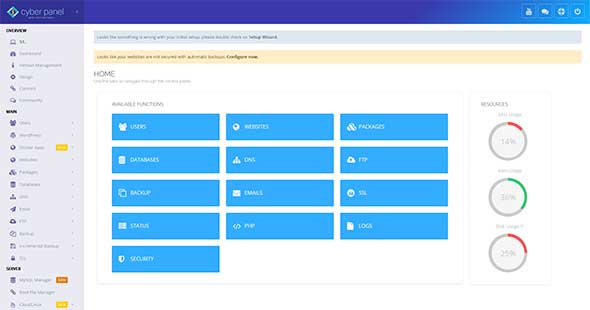
CyberPanel is a hosting panel built for Ubuntu and CentOS servers. It’s built around LiteSpeed, a web server known for speed and strong WordPress performance.
You can manage servers, websites, databases, DNS settings, backups, and security tools — all through your browser.
CyberPanel is built mainly with Python and JavaScript. It doesn’t need a lot of server resources to run well.
Key CyberPanel Features
- User and reseller account management
- Support for multiple PHP versions
- DNS management tools
- phpMyAdmin integration
- File manager and FTP support
- Email hosting with Rainloop webmail
- Remote backup and restore
- Security tools: CSF, ModSecurity, and ImunifyAV
CyberPanel Add-Ons
CyberPanel also offers extra tools, including:
- Main File Manager
- Google Drive backup integration
- WordPress Manager for installs, backups, plugins, and themes
One big advantage is CyberPanel’s tie to LiteSpeed. This can make dynamic websites noticeably faster than standard Apache-based hosting.
CyberPanel is a solid pick if you want a free panel with strong performance and easy WordPress hosting.
Summary
panels make server and website management easier. They give you a simple, visual way to manage domains, databases, email accounts, security settings, and apps.
Premium panels like cPanel, Plesk, DirectAdmin, and RunCloud offer advanced tools, expert support, and strong management features. They work well for businesses, developers, and hosting providers.
Free and open-source panels like aaPanel, CloudPanel, HestiaCP, and CyberPanel are free or very low-cost. They still offer great features and flexibility. This makes them a good fit for developers, startups, and experienced admins.
The best panel for you depends on your tech skills, hosting needs, performance goals, and how you like to work.